Turning Off Lights with my Location After Work
Insert Example Case
You can now automate your home based on your phone’s location. It’s now possible to have your lights turned on whenever you arrive home or to automatically save energy by turning your devices off when you leave home.
- Your Phone can be used as a location trigger in automations.
- Multiple Phones and Locations can be used for automation.
- Customizable Zone for detecting location.
- Optional Enhanced Location Can Greatly Improve Location Accuracy’
To enable Geofencing, you can either follow the process given in the Tapo app or you can find the options and permissions under:
Increase Detection Accuracy with Enhanced Location Detection
Enabling the Enchance Location detection allows the Tapo app to detect your device’s location with higher accuracy and frequency. This option can be found under:
Accuracy: The accuracy of detection determines how precise your location is. If you have ever seen a dot on a map a little ways away from where you are, this means that the app is likely not using your detailed location. Increasing the accuracy will help in situations where your device is reporting an incorrect location.
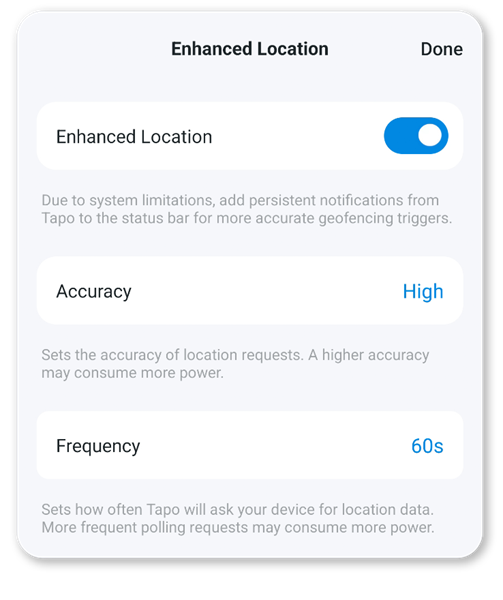
Frequency: The frequency will change how often your device reports its location to the Tapo app. If you find that your automations do not fire on time or you are using the feature to detect areas that are close together, decreasing the time between updates may improve your experience.
You should also enable “Use Precise Location” from within your phone’s permissions for the Tapo App. This will help ensure that the location your phone reports to the Tapo app is accurate.